Apple OS Versions — A Complete Overview
Excluding iOS and macOS · Newest to Oldest

Quick note on "Wear OS": That's actually Google's platform. Apple's wearable OS is watchOS. Also corrected from your list — Apple doesn't have a separate "Wear OS." The full Apple OS family (excluding iOS and macOS) is: iPadOS, watchOS, visionOS, tvOS, HomePod Software (audioOS), and bridgeOS.
🍎 The Apple OS Family Tree
OS | Device | First Released |
|---|---|---|
visionOS | Apple Vision Pro | 2024 |
iPadOS | iPad lineup | 2019 |
watchOS | Apple Watch | 2015 |
tvOS | Apple TV | 2015 |
HomePod Software (audioOS) | HomePod | 2018 |
bridgeOS | T-chip / Apple Silicon internals | 2017 |
🥽 visionOS — Spatial Computing
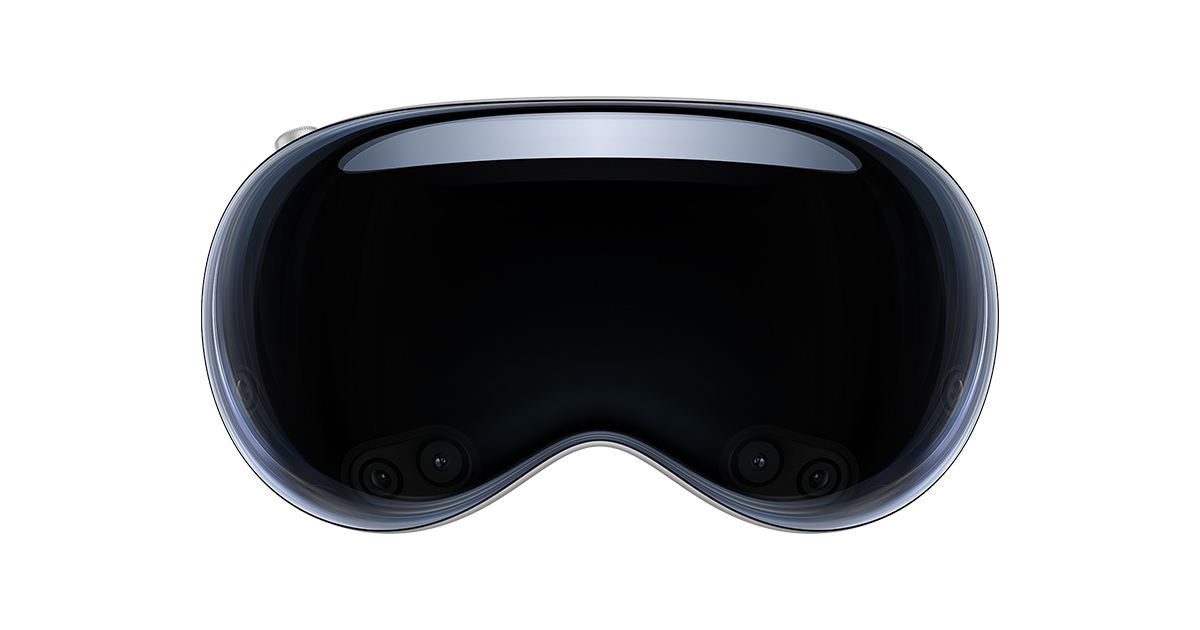
Apple's newest OS, built for the Apple Vision Pro. It reimagines computing in 3D space — apps float in your environment, controlled by eyes, hands, and voice.
Versions (newest → oldest)
visionOS 26 (2025 — Current)
Devices: Apple Vision Pro (1st gen)
Key Features:
🪟 Persistent widgets that stay anchored in your physical space
🧑 More realistic, expressive Personas for FaceTime
🌌 Spatial Scenes — lifelike depth for photos
🧊 Liquid Glass design language across the entire UI
🌐 Spatial browsing in Safari with embedded 3D objects
UI/UX Insight: The shift to persistent widgets is huge — it signals Apple moving visionOS from a "put on, pick up, put down" experience to something more ambient and always-present. Liquid Glass brings visual unity with other Apple platforms for the first time.
visionOS 2 (2024)
Devices: Apple Vision Pro (1st gen)
Key Features:
🖼️ Turn flat photos into 3D spatial photos
🤝 SharePlay in shared spaces
🗂️ Improved Home View layout with larger gestures
📱 iPhone Mirroring via Mac
UI/UX Insight: Apple addressed the biggest complaint from launch — making the UI more accessible and natural. The spatial photo feature made personal content finally feel native to the medium.
visionOS 1 (2024 — Launch)
Devices: Apple Vision Pro (1st gen)
Key Features:
👁️ Eye + hand + voice input — no controller needed
🌀 Environments (Yosemite, Moon, etc.) as virtual backgrounds
🎬 Immersive video at up to 180°
📲 Compatible iPhone/iPad apps run side-by-side
UI/UX Insight: A completely new interaction paradigm. The "look to focus, pinch to select" model is elegant but has a steep learning curve. Apple prioritized spatial clarity and depth over flat-screen conventions.
📱 iPadOS — The Productivity Powerhouse

Split off from iOS in 2019, iPadOS is built around the idea of a tablet that works like a computer — but stays approachable.
Versions (newest → oldest)
iPadOS 26 (2025 — Current)
Devices: iPad Pro (M1+), iPad Air (M1+), iPad mini 7, iPad (A14+)
Key Features:
🧊 Liquid Glass design — translucent, dynamic UI
🪟 New tiling windowing system — resize and snap apps like a Mac
✏️ Enhanced Apple Pencil features
🧠 Expanded Apple Intelligence tools
🌐 Live Translation in Messages and FaceTime
UI/UX Insight: The new windowing system is the biggest iPad multitasking evolution yet. Liquid Glass gives the UI depth without sacrificing readability — a tough balance that mostly lands well.
iPadOS 18 (2024)
Devices: iPad Pro (M1+), iPad Air (M2+), iPad mini 6+, iPad (A14+)
Key Features:
🤖 Apple Intelligence (writing tools, image generation)
🎨 Math Notes in Calculator — solve equations by hand
🖼️ Revamped Photos app
🌙 Customizable home screen icons (dark/tinted modes)
🔒 Lock apps with Face ID
UI/UX Insight: Apple Intelligence debut felt more like a foundation than a finished product — useful, but not yet transformative. The Math Notes feature was a genuine delight.
iPadOS 17 (2023)
Devices: iPad Pro (A12X+), iPad Air (3rd gen+), iPad mini (5th gen+), iPad (6th gen+)
Key Features:
🔒 Customizable Lock Screen with widgets
❤️ Health app finally comes to iPad
📝 Interactive widgets on Home Screen
🛏️ StandBy-style improvements
UI/UX Insight: Lock Screen customization arrived a year late compared to iPhone. Still, the Health app addition was long overdue and showed Apple treating iPad as a real personal device.
iPadOS 16 (2022)
Devices: iPad Pro (A12X+), iPad Air (3rd gen+), iPad mini (5th gen+), iPad (5th gen+)
Key Features:
🗂️ Stage Manager — overlapping, resizable windows
🖥️ External display support (iPad Pro/Air)
🌤️ Weather app finally comes to iPad
🎨 Freeform — collaborative digital whiteboard
UI/UX Insight: Stage Manager was polarizing at launch — confusing UI that Apple had to iterate on mid-cycle. External display support was a breakthrough, but felt unpolished compared to macOS.
iPadOS 15 (2021)
Devices: iPad Pro (A12X+), iPad Air (3rd gen+), iPad mini (5th gen+), iPad (6th gen+)
Key Features:
📱 Widgets on Home Screen (catching up with iOS 14)
📚 App Library support
🖱️ Universal Control — share keyboard/mouse across Mac + iPad
🗒️ Quick Notes from any app
UI/UX Insight: Universal Control was the killer feature — genuinely magical the first time you drag your cursor across devices. It made the iPad feel like a natural extension of the Mac workflow.
iPadOS 14 (2020)
Devices: iPad Pro (A12X+), iPad Air (3rd gen+), iPad mini (5th gen+), iPad (6th gen+)
Key Features:
✍️ Scribble — handwrite in any text field with Apple Pencil
🔍 Compact Siri UI (no more full-screen takeover)
🧩 Redesigned widgets (sidebar, not home screen yet)
📞 Incoming calls as banners, not full-screen interruptions
UI/UX Insight: Scribble was a breakthrough for Apple Pencil adoption. The compact call/Siri UI showed Apple learning from years of user frustration with interruptive overlays.
iPadOS 13 (2019 — First Release)
Devices: iPad Air (2nd gen+), iPad mini (5th gen), iPad (5th gen+), iPad Pro
Key Features:
🌑 Dark Mode
🔀 Improved Split View + Slide Over
🖥️ Desktop-class Safari (with download manager)
🖥️ Sidecar — use iPad as a second Mac display
UI/UX Insight: The birth of iPadOS. Sidecar and desktop Safari signaled Apple taking iPad productivity seriously for the first time.
⌚ watchOS — Your Wrist, Smarter

watchOS powers the Apple Watch — optimized for glanceable, one-handed, health-first interactions.
Versions (newest → oldest)
watchOS 26 (2025 — Current)
Devices: Apple Watch Series 6+, Ultra, SE (2nd gen)
Key Features:
🏃 Workout Buddy — AI-powered audio coaching based on your fitness history
🧊 Liquid Glass watch face elements
🌐 Live Translation on wrist
🧠 Apple Intelligence integration
UI/UX Insight: Workout Buddy is a smart use of Apple Intelligence — context-aware, personal, and genuinely useful during workouts without needing to pick up your phone.
watchOS 11 (2024)
Devices: Apple Watch Series 6+, Ultra (1st/2nd gen), SE (2nd gen)
Key Features:
📊 Training Load — tracks workout intensity over time
😴 Vitals app — morning health snapshot
🌡️ Check In improvements
⏸️ Pause Activity Rings (finally!)
UI/UX Insight: Pausing Activity Rings was the most-requested feature for years. Vitals app turned the Watch into a real morning health dashboard — not just a step counter.
watchOS 10 (2023)
Devices: Apple Watch Series 4+, Ultra, SE (2nd gen)
Key Features:
🔘 New Smart Stack of widgets via Digital Crown
🗺️ Redesigned apps (Weather, Maps, Activity)
🚵 Cycling Power Meter support
👁️ Depth gauge for Apple Watch Ultra 2
UI/UX Insight: Biggest watchOS redesign in years. The Smart Stack finally made widgets feel natural on a small screen. Some longtime users found the navigation shift confusing initially.
watchOS 9 (2022)
Devices: Apple Watch Series 4+, SE (1st/2nd gen)
Key Features:
🏃 Advanced running metrics (stride length, vertical oscillation)
💊 Medications app
😴 Sleep Stages tracking
🎨 New watch faces (Lunar, Playtime, Metropolitan)
UI/UX Insight: Sleep Stages was a major health upgrade — turning the Watch into a meaningful sleep tracker rather than just a sleep logger.
watchOS 8 (2021)
Devices: Apple Watch Series 3+
Key Features:
🧘 Mindfulness app (replacing Breathe)
🏠 Home app redesign
📸 Portraits watch face
💬 GIF and emoji in Messages
UI/UX Insight: The Mindfulness rebranding felt intentional — Apple quietly expanding the Watch's mental wellness identity beyond just physical health.
watchOS 7 (2020)
Devices: Apple Watch Series 3+
Key Features:
😴 Sleep tracking (debut)
🤲 Hand washing detection + timer
🔀 Watch face sharing
💃 Dance workout type
UI/UX Insight: Sleep tracking was years late versus competitors, but Apple did it right — automatic detection and actionable insights from day one.
watchOS 6 (2019)
Devices: Apple Watch Series 1+
Key Features:
🎵 App Store on the Watch (standalone apps!)
⭕ Activity Trends
🔊 Noise app — ambient sound monitoring
🩺 Cycle Tracking
UI/UX Insight: The Watch became independent from iPhone for app installs — a fundamental shift that made watchOS a real platform, not just a companion.
watchOS 1–5 (2015–2018)
First Apple Watch OS, evolving from basic notifications and fitness tracking through app redesigns, Siri on the wrist, Walkie-Talkie, and the first dedicated podcast app.
📺 tvOS — The Living Room OS
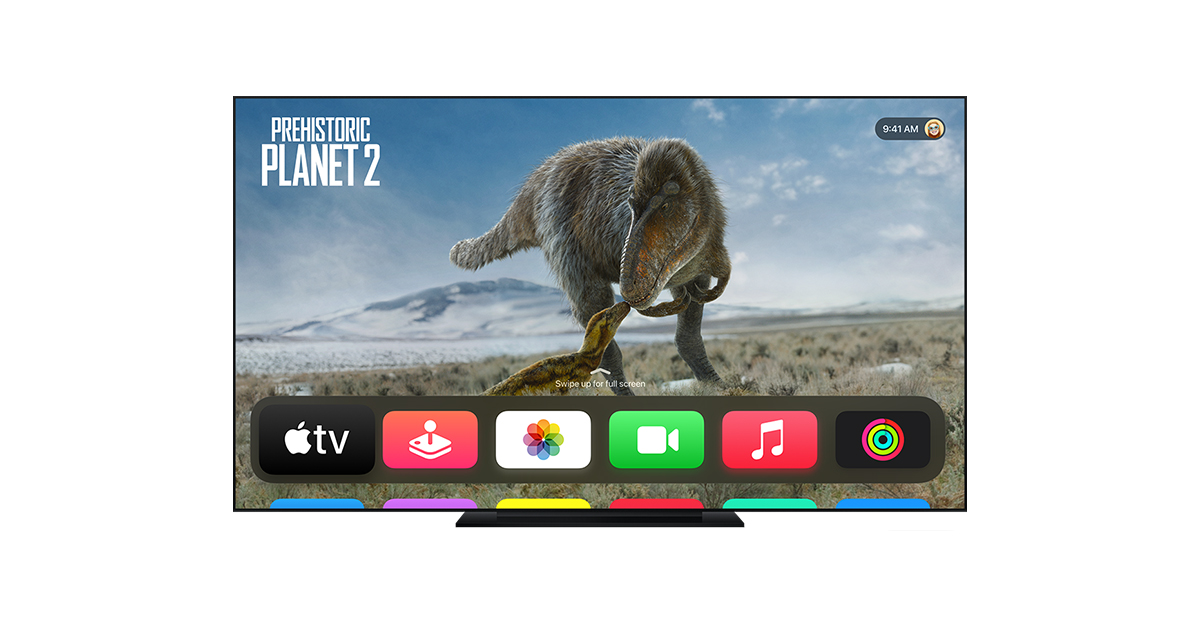
tvOS runs on Apple TV 4K — designed for lean-back, 10-foot UI experiences.
Versions (newest → oldest)
tvOS 26 (2025 — Current)
Devices: Apple TV 4K (2nd gen+)
Key Features:
🎤 Sing in Apple Music — iPhone as wireless mic for karaoke
🪟 Liquid Glass UI across menus
📱 Contact Posters on FaceTime
🎬 Cinematic poster art in the Apple TV app
UI/UX Insight: Sing mode turns Apple TV into a legit social entertainment hub. The Liquid Glass design makes tvOS feel unified with the rest of Apple's ecosystem for the first time.
tvOS 18 (2024)
Devices: Apple TV 4K (2nd gen+)
Key Features:
🔊 InSight — on-screen info about actors and songs while watching
🗣️ Subtitles for live dialogue
🎮 Game Mode improvements
UI/UX Insight: InSight is tvOS's answer to X-Ray on Fire TV — helpful, non-intrusive, and accessible. Dialogue subtitles addressed a real accessibility gap.
tvOS 17 (2023)
Devices: Apple TV 4K (2nd gen+)
Key Features:
📹 FaceTime on Apple TV (with iPhone/iPad as camera)
🎮 Vision Pro app preview
🔮 Control Center redesign
UI/UX Insight: FaceTime on the big screen is genuinely useful for family calls. Using your iPhone as the camera was clever — avoids adding hardware to Apple TV.
tvOS 16 (2022)
Devices: Apple TV 4K (2nd gen+)
Key Features:
📺 Improved Siri Remote with redesigned buttons
🎮 Better game controller support
🔑 Passkeys in apps
UI/UX Insight: The new Siri Remote was long overdue. tvOS is largely iterative — Apple improves the experience without overhauling what already works well.
tvOS 1–15 (2015–2021)
tvOS launched in 2015 as a revamped Apple TV experience with an App Store, Siri remote, and third-party apps. Each year brought refinements — multi-user support (tvOS 13), AirPlay 2, HomeKit hub features, 4K HDR, and picture-in-picture.
🔊 HomePod Software (audioOS)
Built on a stripped-down version of iOS/audioOS, HomePod software powers the speaker experience — no screen, all ears.
Current: HomePod Software 26 (2025)
Key Features across versions:
🏠 Smart home hub (Thread, Matter, HomeKit)
🎵 Spatial Audio + Dolby Atmos
📞 Handoff calls from iPhone
🧠 Siri improvements each year
👤 Personal Requests (recognizes voices for reminders, messages)
🔉 Intercom between HomePods
UI/UX Insight: HomePod has no traditional UI — every interaction is voice or the small touch surface. Apple's design challenge is making it feel responsive and smart without any screen feedback. Sound design and voice tone are the UX.
🔌 bridgeOS — The Silent OS
Most people never think about bridgeOS, but it runs quietly on Apple's T-series and Apple Silicon chips — managing Touch Bar (on older MacBooks), Secure Enclave, Touch ID, and hardware security features.
Not user-facing. It updates silently in the background alongside macOS. The design philosophy: invisible, secure, always-on.
🧊 The Big Story: Liquid Glass (2025)
In 2025, Apple did something it hadn't done since iOS 7 in 2013 — a unified design overhaul across every platform at once.
Liquid Glass is a translucent material that reflects and refracts the content behind it, dynamically adapting to light and color. It debuted simultaneously on iPadOS 26, watchOS 26, tvOS 26, and visionOS 26.
For the first time, you can look at an iPad, Apple Watch, Apple TV, and Vision Pro and see the same visual DNA — something Apple has been building toward for a decade.
Sources: Apple Newsroom, Wikipedia, Apple Support